
Settld
Split the bill, not your friendships.
Scan a receipt. Tap who had what. Get paid instantly. Settld turns the dinner-table calculator moment into a 10-second tap. No spreadsheets. No group-chat math. No "I'll get you later."
Free to start · No fees for payers · 60-second setup
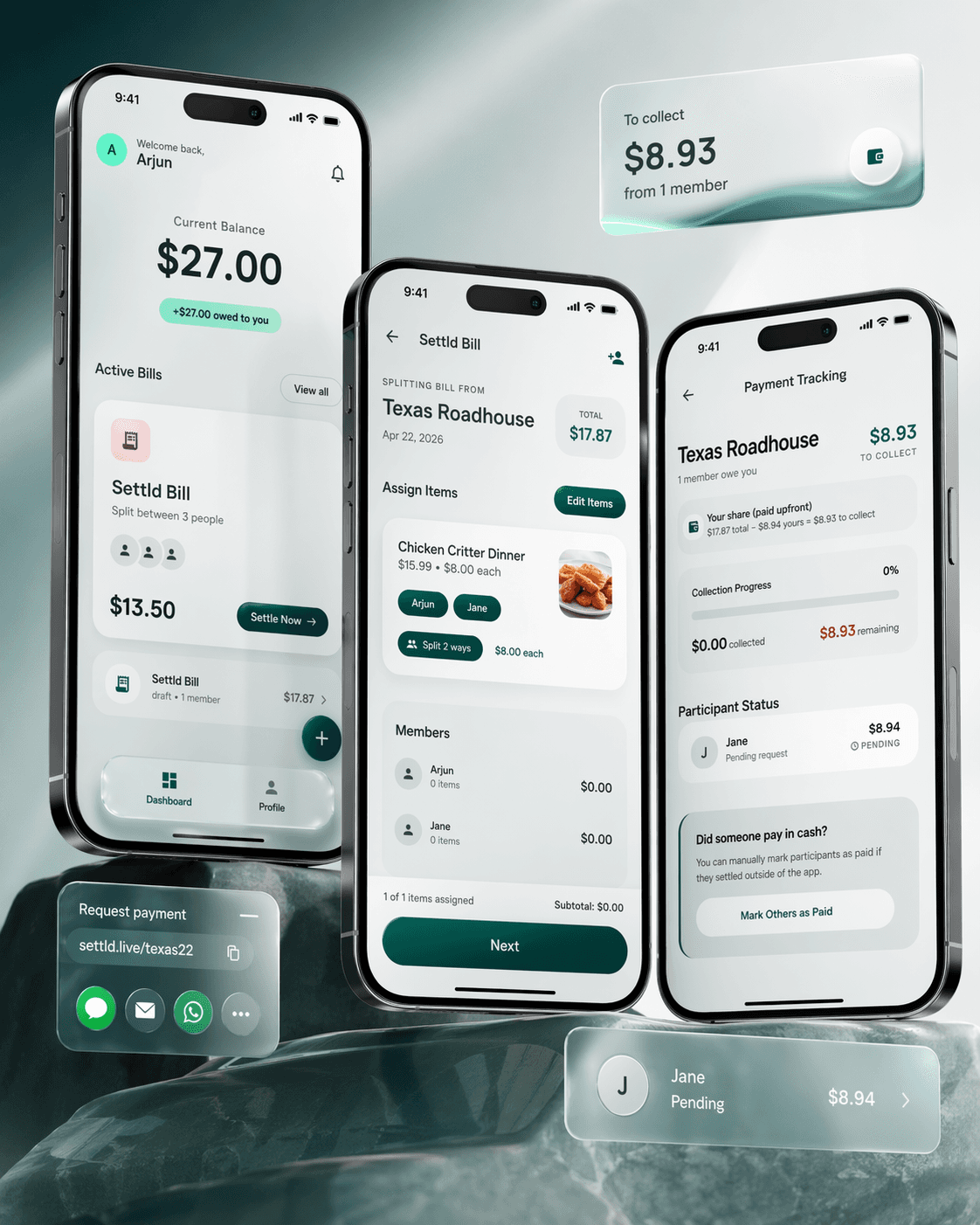
Built for the end of every dinner. Scan the receipt, assign who had what, and send a pay link - your friends pay in any browser without downloading anything.
$0
Fees for payers
3 taps
To settle a bill
60s
Average setup time
No signup
Required for payers
How it works
From receipt to settled in three taps.
Scan
Snap it. We'll read the fine print.
Point your camera at any receipt. Settld pulls every item, tax, and tip in seconds. No typing, no re-entering prices you already paid for.
Assign
Tap to assign. Math does itself.
Drop items onto your friends, or share them evenly. Tax and tip split proportionally, down to the cent. Nobody gets stuck paying for the steak they didn't order.
Share
One link. Everyone pays.
Send a pay link through iMessage, WhatsApp, or AirDrop. Friends open it in any browser and pay with Apple Pay, card, or bank. No app required on their end.
Inside the app
Every screen is production. Here's what Settld looks like in practice.
Dashboard
Your home screen shows your current balance - how much friends owe you - and all active bills at a glance. One tap to settle any bill or create a new one.

Balance Tracking
- Real-time balance aggregated across all active bills - shows total owed to you
- Each bill card shows member count, individual total, and settle action
Bill Management
- Active bills with draft/settled status - create new bills with the FAB button
- Every bill archived so you never lose a record of who paid what
Assign Items
After OCR scans the receipt, every item appears as an assignable card. Tap to drop items onto group members. Unassigned items are flagged so nothing gets missed. The restaurant name, date, and total are pulled automatically.

OCR Pipeline
- Receipt scanned via on-device OCR - extracts item names, prices, tax, and tip in under 3 seconds
- Trained on real-world restaurant receipts - handles crumpled, faded, and handwritten totals
- Edit Items button lets you correct any OCR misread before assignment
Assignment Logic
- Tap member names to assign - items track assigned vs unassigned state with visual indicators
- Running subtotal and assignment count update live as you assign items
Split Items Between People
Shared an appetizer? Tap multiple people on any item to split it evenly. The per-person cost updates in real time. Tax and tip are distributed proportionally based on each person's item total - down to the cent.

Proportional Splitting Algorithm
- Each item can be split between any number of people - cost divided evenly with per-person amount shown
- Tax and tip distributed proportionally based on each person's share of the subtotal - not split evenly across the group
- Rounding handled so totals always match the receipt - no missing pennies, no overcharging
Share the Pay Link
One link. Everyone pays. Send via iMessage, AirDrop, WhatsApp, or any messaging app. Friends open it in any browser - no app download, no account creation. They see their share and pay with Apple Pay, Google Pay, or card.

Pay Link Architecture
- Each bill generates a unique settld.live URL - opens a mobile-optimized payment page in any browser
- Payers see their itemized share, total with tax/tip, and payment options - no ambiguity
Stripe Integration
- Stripe Connect handles all payment processing - PCI-DSS Level 1, card numbers never touch our servers
- Supports Apple Pay, Google Pay, all major cards, and bank transfers - instant payouts for most methods
Payment Tracking
Know the moment you're settled. Real-time collection tracking shows who's paid and who hasn't. One-tap reminders for stragglers. Cash payments can be marked manually - the tracker keeps up either way.

Collection Tracking
- Live progress bar updates as each friend pays - shows collected vs remaining amount
- Your share (paid upfront) is calculated and subtracted automatically - you only collect the difference
Participant Management
- Per-person status: Pending, Paid, or manually marked - one-tap reminders for pending participants
- Cash payment support - mark friends as paid if they settled outside the app
Why Settld
Everything you need. Nothing you don't.
Apple Pay & cards
Every major payment method: Apple Pay, Google Pay, Visa, Mastercard, Amex, Discover.
Instant payouts
Money hits your account instantly for most methods, 1–2 business days for bank transfers.
OCR receipt scan
Trained on real receipts. Pulls items, tax, and tip in under 3 seconds. No retyping.
Tax & tip to the cent
Proportional splitting means nobody overpays on the tax or tip for items they didn't order.
No signup for payers
Friends open a link in any browser and pay in seconds. Zero friction. Zero excuses.
Bank-level security
Powered by Stripe. PCI-DSS Level 1 certified. We never see or store card numbers.
How we built it
The technical decisions behind Settld.
OCR Receipt Parsing
Most receipt scanners fail on real-world receipts - crumpled paper, faded ink, inconsistent formatting across restaurants. We trained the OCR pipeline specifically on restaurant receipt data to handle edge cases that generic OCR misses.
Extraction Pipeline
- Camera input processed through on-device OCR with receipt-specific text region detection
- Structured extraction: item names, individual prices, subtotal, tax lines, tip, and grand total
- Validation step cross-checks extracted items against the total - flags discrepancies for manual review
Edge Case Handling
- Handles multi-line item descriptions, modifier lines (e.g. "add bacon +$2"), and discount rows
- Works on crumpled, skewed, and partially faded receipts via preprocessing (deskew, contrast enhancement)
- Under 3-second processing time including camera capture, OCR, and structured extraction
Proportional Splitting Engine
The splitting math sounds simple until you account for shared items, proportional tax, tip distribution, and penny-level rounding. We built a splitting engine that guarantees the sum of all shares exactly equals the receipt total - no missing pennies, no overcharging.
- Item splitting: any item can be assigned to N people - cost divided evenly with remainder distributed
- Proportional tax: tax distributed based on each person's share of the subtotal, not split evenly - the person with the $50 steak pays more tax than the person with the $12 salad
- Tip distribution: same proportional logic - tip is weighted by each person's item total
- Rounding guarantee: largest-remainder method ensures individual shares sum to exact receipt total
Stripe Connect Payment Flow
The hardest UX constraint: payers should never need to download an app or create an account. We built a web-based payment flow using Stripe Connect that works in any browser - the person splitting the bill has a Stripe-connected account, and payers just open a link and tap Apple Pay.
Payment Architecture
- Bill creator is a Stripe Connect account - payouts go directly to their bank
- Each payer gets a unique Stripe Checkout session with their exact share pre-filled
- Stripe webhooks update payment status in real time - dashboard shows collection progress instantly
Security
- PCI-DSS Level 1 compliance via Stripe - we never see or store card numbers
- $0 fees for payers - platform fee structure handles costs on the creator side
- Instant payouts for Apple Pay and card payments; 1–2 business days for bank transfers
Technical Highlights
What powers Settld under the hood.
Built OCR receipt scanning pipeline with receipt-specific text region detection - extracts items, prices, tax, and tip from real-world restaurant receipts in under 3 seconds
Designed proportional splitting algorithm distributing tax and tip based on each person's item share - largest-remainder rounding guarantees individual totals sum to exact receipt amount
Integrated Stripe Connect for zero-friction payments - payers open a web link in any browser and pay with Apple Pay, Google Pay, or card without downloading an app or creating an account
Built real-time collection tracking with Stripe webhooks - dashboard updates instantly as each friend pays, with one-tap reminders and manual cash payment marking
Shipped cross-platform React Native app with on-device OCR, iOS Share Extension for pay links, and a web payment portal that works on iOS, Android, and desktop browsers
Architecture
End-to-end system from camera to bank account.
Mobile App
Backend
Payments
Web Portal
Stop chasing friends for money.
Download the app and settle your first bill in under a minute. Free to download. No fees for payers. Available on iOS & Android.
Get Settld